A walk through to Neo4j
Concepts
1. What is index-free adjacency?
Index-free adjacency (IFA) is a property of Neo4j’s native graph engine that eliminates the need for complex joins and enables real-time traversals. With IFA, Neo4j stores nodes and relationships as objects that are linked to each other. Conceptually, the graph looks as follows:
Using IFA, the Neo4j query engine starts with the anchor of the query which is the Group node with the id of 3.
IFA is a key trait of a graph database that allows it to find the neighbors of any given node without having to consider the full set of relationships in the graph.
Relationship in Neo4j graph database are stored at
write timewhile joins are computed atread timein RDBMS.
2. Graph Elements
| Element | Description |
|---|---|
| Node | A node will commonly represent an individual record, for example, a thing or a fact. |
| Label | Nodes can have one or more labels. Labels provide a way to group nodes and also serve as a starting point for any database queries. |
| Relationship | A relationship connects two nodes. Each relationship has exactly one start and end node. A relationship will have a single a type. |
| Type | Relationships are identified by their type. |
| Property | Both nodes and relationships can contain properties. A property is a key/value pair. |
3. Modeling Rules
- Nodes typically represent things. Examples of entities that could typically be represented as a node are: person, product, event, book or subway station.
- Relationships are typically verbs. We could use a relationship to represent a personal or professional connection (Person knows Person, Person married to Person), to state a fact (Person lives in Location, Person owns Car, Person rated Movie), or even to represent a hierarchy (Parent parent of Child, Software depends on Library).
- Verbs can also be nodes. A verb may be modeled as a node when one or more facts need to be associated with it. For example, you may want to group multiple product purchases through a single
(:Order)node.
1. What is Graph Database?
Graph Database is a database that model the data in the form of graph. In here, the nodes of the graph represent the entities while relation depict the association of these nodes.
2. Environment Setup
Make a docker-compose.yml file and write these lines.
version: "3.8"

services:
  neo4j:
    image: neo4j:latest
    container_name: neo4j
    restart: always
    ports:
      - "7473:7473"
      - "7474:7474"
      - "7687:7687"
    environment:
      - NEO4J_AUTH=neo4j/mysupersecretpassword
    volumes:
      - neo4j-data:/data
volumes:
  neo4j-data:
3. Neo4j building blocks
Neo4j Graph Database has the following building blocks:
- Nodes: is a fundamental unit of a Graph. It contains properties with key value pairs.
- Properties: is a key-value pair to describe Graph Nodes and Relationships.
- Relationships: connects two nodes
- Labes: Label associates a common name to a set of nodes or relationships. A node or relationship can contain one or more labels. We can create new labels to existing nodes or relationships. We can remove the existing labels from the existing nodes or relationships.
- Data Browser
4. Neo4j-CQL Introduction
Neo4j CQL
- Is a query language for Neo4j Graph Database.
- Is a declarative pattern-matching language.
- Follows SQL like syntax.
- Syntax is very simple and in human readable format.
Neo4j Clauses
Neo4j Read Clauses
| SN | Read Clauses | Usage |
|---|---|---|
| 1 | MATCH | Used to search the data with a specified pattern |
| 2 | OPTIONAL MATCH | Same as match, the only difference being it can use nulls in case of missing part of patterns |
| 3 | WHERE | Used to add contents to the CQL queries |
| 4 | START | Used to find the starting points through the legacy indexes |
| 5 | LOAD CSV | Used to import data from CSV files |
Neo4j Write Clauses
| SN | Write Clauses | Usage |
|---|---|---|
| 1 | CREATE | Used to create Nodes, Relationships, and Properties |
| 2 | MERGE | Verifies whether specified pattern exists in the graph, If not, it creates the pattern |
| 3 | SET | Used to update labels on nodes, properties on nodes and relationships |
| 4 | DELETE | Used to delete nodes and relationships or paths |
| 5 | REMOVE | Used to remove properties and elements from nodes and relationships |
| 6 | FOREACH | Used to update the data within a list |
| 7 | CREATE UNIQUE | Using the clauses CREATE and MATCH, you can get a unique pattern by matching the existing pattern and creating the missing one |
Neo4j General Clauses
| SN | General Clauses | Usage |
|---|---|---|
| 1 | RETURN | Used to define what to include in the query result set |
| 2 | ORDER BY | Used to arrange the output of a query in order. It is used along with the clauses RETURN or WITH. |
| 3 | LIMIT | Used to limit the rows in the result to a specific value |
| 4 | SKIP | Used to define from which row to start including the rows in the output |
| 5 | WITH | Used to chain the query parts together |
| 6 | UNWIND | Used to expand a list into a sequence of rows |
| 7 | UNION | Used to combine the result of multiple queries |
| 8 | CALL | Used to invoke a procedure deployed in the database |
CQL Functions
| SN | CQL | Usage |
|---|---|---|
| 1 | String | Used to work with String literals. |
| 2 | Aggregation | Used to perform some aggregation operations on CQL Query results. |
| 3 | Relationship | Used to get details of relationships such as startnode, endnode, etc. |
CQL Data Types
| SN | CQL | Data Type Usage |
|---|---|---|
| 1 | Boolean | Used to represent Boolean literals: true, false. |
| 2 | byte | Used to represent 8-bit integers. |
| 3 | short | Used to represent 16-bit integers. |
| 4 | int | Used to represent 32-bit integers. |
| 5 | long | Used to represent 64-bit integers. |
| 6 | float | Used to represent 32-bit floating-point numbers. |
| 7 | double | Used to represent 64-bit floating-point numbers. |
| 8 | char | Used to represent 16-bit characters. |
| 9 | String | Used to represent Strings. |
CQL Operators
| SN | Type | Operators |
|---|---|---|
| 1 | Mathematical | +, -, *, /, %, ^ |
| 2 | Comparison | +, <>, <, >, <=, >= |
| 3 | Boolean | AND, OR, XOR, NOT |
| 4 | String | + |
| 5 | List | +, IN, [X], [X…..Y] |
| 6 | Regular Expression | =- |
| 7 | String | matching STARTS WITH, ENDS WITH, CONSTRAINTS |
Boolean Operators
| SN | Boolean | Operators Description |
|---|---|---|
| 1 | AND | Like SQL AND operator. |
| 2 | OR | Like SQL OR operator. |
| 3 | NOT | Like SQL NOT operator. |
| 4 | XOR | Like SQL XOR operator. |
Comparision Operators
| SN | Boolean | Operators Description |
|---|---|---|
| 1 | = | "Equal To" operator. |
| 2 | <> | "Not Equal To" operator. |
| 3 | < | "Less Than" operator. |
| 4 | > | "Greater Than" operator. |
| 5 | <= | "Less Than Or Equal To" operator. |
| 6 | >= | "Greater Than Or Equal To" operator. |
5. Creating Nodes
Creating a single node
Create node by simply specifying the name of the node that is to be created along with the CREATE clause.
Syntax
CREATE (node_name)
Verification
MATCH (n) RETURN n
Creating a multiple nodes
Syntax
CREATE (node1),(node2)
Creating a Node with a Label
Syntax
CREATE (node:label)
Example
CREATE (Dhawan:player)
Creating a Node with Multiple Labels
Syntax
CREATE (node:label1:label2:. . . . labeln)
Example
CREATE (Dhawan: person: player)
Create Node with Properties
Syntax
CREATE (node:label { key1: value, key2: value, . . . . . . . . . })
Example
CREATE (Dhawan:player {name: "Shikar Dhawan", YOB: 1985, POB: "Delhi"})
Returning the Created Node
Syntax
CREATE (Node:Label {properties. . . . }) RETURN Node
Example
CREATE (Dhawan:player {name: "Shikar Dhawan", YOB: 1985, POB: "Delhi"}) RETURN Dhawan
6. Creating a Relationship
Creating Relationships
Syntax
CREATE (node1)-[:RelationshipType]->(node2)
Example
CREATE (Dhawan:player {name: "Shikar Dhawan", YOB: 1985, POB: "Delhi"})
CREATE (Ind:Country {name: "India"})

CREATE (Dhawan)-[r:BATSMAN_OF]->(Ind)
RETURN Dhawan, Ind
Creating a Relationship Between the Existing Nodes
Syntax
MATCH (a:LabeofNode1), (b:LabeofNode2)
   WHERE a.name = "nameofnode1" AND b.name = " nameofnode2"
CREATE (a)-[: Relation]->(b)
RETURN a,b
Example
MATCH (a:player), (b:Country) WHERE a.name = "Shikar Dhawan" AND b.name = "India"
CREATE (a)-[r: BATSMAN_OF]->(b)
RETURN a,b
Creating a Relationship with Label and Properties
Syntax
CREATE (node1)-[label:Rel_Type {key1:value1, key2:value2, . . . n}]-> (node2)
Example
MATCH (a:player), (b:Country) WHERE a.name = "Shikar Dhawan" AND b.name = "India"
CREATE (a)-[r:BATSMAN_OF {Matches:5, Avg:90.75}]->(b)
RETURN a,b
Creating a complete path
Syntax
CREATE p = (Node1 {properties})-[:Relationship_Type]->
   (Node2 {properties})[:Relationship_Type]->(Node3 {properties})
RETURN p
CREATE p = (Dhawan:Player {name: "Shikhar Dhawan"}) - [:TOPSCORER_OF] -> (Ind:Country {name: "India"}) - [:WINNER_OF] -> (CT2013:Tournament {name: "Champion Trophy 2013"}) RETURN p
7. Merge Command
MERGE command is a combination of CREATE command and MATCH command.
Neo4j CQL MERGE command searches for a given pattern in the graph. If it exists, then it returns the results else it creates a new node/relationship and returns the results.
Syntax
MERGE (node: label {properties . . . . . . . })
Before proceeding to the examples, create these nodes,
CREATE (Dhawan:player {name: "Shikar Dhawan", YOB: 1985, POB: "Delhi"})
CREATE (Ind:Country {name: "India"})
CREATE (Dhawan)-[r:BATSMAN_OF]->(Ind)
Merging a Node with a Label
Syntax
MERGE (node:label) RETURN node
Example 1
MERGE (Jadeja:player) RETURN Jadeja
When you execute this query, Neo4j verifies whether there is any node with the label player. If not, it creates a node named “Jadeja” and returns it.
Example 2
MERGE (CT2013:Tournament {name: "ICC Champions Trophy 2013"})
RETURN CT2013, labels(CT2013)
Merging a Node with Properties
Syntax
MERGE (node:label {key1:value, key2:value, key3:value . . . . . . . . })
MERGE (Jadeja:player {name: "Ravindra Jadeja", YOB: 1988, POB: "NavagamGhed"})
RETURN Jadeja
OnCreate and OnMatch
Whenever, we execute a merge query, a node is either matched or created. Using on create and on match, you can set properties for indicating whether the node is created or matched.
Syntax
MERGE (node:label {properties . . . . . . . . . . .})
ON CREATE SET property.isCreated ="true"
ON MATCH SET property.isFound ="true"
Merge a relationship
MATCH (a:Country), (b:Tournament)
   WHERE a.name = "India" AND b.name = "ICC Champions Trophy 2013"
   MERGE (a)-[r:WINNERS_OF]->(b)
RETURN a, b
8. Set Clause
Add new properties to an existing Node or Relationship, and also add or update or remove existing Properties values.
Setting a Property
Syntax
MATCH (node:label {properties . . . . . . . . . . . . . . })
SET node.property = value
RETURN node
Before proceeding, seed this data
CREATE (Dhawan:player {name: "shikar Dhawan", YOB: 1985, POB: "Delhi"})
Now, set example,
MATCH (Dhawan:player {name: "shikar Dhawan", YOB: 1985, POB: "Delhi"})
SET Dhawan.highestscore = 187
RETURN Dhawan
Remove property
Syntax
MATCH (node:label {properties})
SET node.property = NULL
RETURN node
Example
First create a node,
Create (Jadeja:player {name: "Ravindra Jadeja", YOB: 1988, POB: "NavagamGhed"})
Now, remove property,
MATCH (Jadeja:player {name: "Ravindra Jadeja", YOB: 1988, POB: "NavagamGhed"})
SET Jadeja.POB = NULL
RETURN Jadeja
Setting multiple properties
Syntax
MATCH (node:label {properties})
SET node.property1 = value, node.property2 = value
RETURN node
Example
MATCH (Jadeja:player {name: "Ravindra Jadeja", YOB: 1988})
SET Jadeja.POB = "NavagamGhed", Jadeja.HS = "90"
RETURN Jadeja
Setting a Label on a Node
Syntax
MATCH (n {properties . . . . . . . })
SET n :label
RETURN n
First, create a node;
CREATE (Anderson {name: "James Anderson", YOB: 1982, POB: "Burnely"})
Now, set label to this node;
MATCH (Anderson {name: "James Anderson", YOB: 1982, POB: "Burnely"})
SET Anderson: player
RETURN Anderson
Setting Multiple Labels on a Node
Syntax
MATCH (n {properties . . . . . . . })
SET n :label1:label2
RETURN n
First, create a node,
CREATE (Ishant {name: "Ishant Sharma", YOB: 1988, POB: "Delhi"})
Now, set multiple label,
MATCH (Ishant {name: "Ishant Sharma", YOB: 1988, POB: "Delhi"})
SET Ishant: player:person
RETURN Ishant
9. Delete Clause
Deleting all Nodes and Relationships
Query
MATCH (n) DETACH DELETE n
Deleting a Particular Node
Syntax
MATCH (node:label {properties . . . . . . . . . .  })
DETACH DELETE node
First, create a node.
CREATE (Ishant:player {name: "Ishant Sharma", YOB: 1988, POB: "Delhi"})
Delete a node,
MATCH (Ishant:player {name: "Ishant Sharma", YOB: 1988, POB: "Delhi"})
DETACH DELETE Ishant
10. Remove Clause
DELETEoperation is used to delete nodes and associated relationships.REMOVEoperation is used to remove labels and properties.
Removing a Property
Syntax
MATCH (node:label {properties . . . . . . . })
REMOVE node.property
RETURN node
First, create a node
CREATE (Dhoni:player {name: "MahendraSingh Dhoni", YOB: 1981, POB: "Ranchi"}) RETURN Dhoni
Now, remove a property
MATCH (Dhoni:player {name: "MahendraSingh Dhoni", YOB: 1981, POB: "Ranchi"})
REMOVE Dhoni.POB
RETURN Dhoni
Removing a Label From a Node
Syntax
MATCH (node:label {properties . . . . . . . . . . . })
REMOVE node:label
RETURN node
Example
MATCH (Dhoni:player {name: "MahendraSingh Dhoni", YOB: 1981, POB: "Ranchi"})
REMOVE Dhoni:player
RETURN Dhoni
Removing Multiple Labels
Syntax
MATCH (node:label1:label2 {properties . . . . . . . . })
REMOVE node:label1:label2
RETURN node
First, create a node
CREATE (Ishant:player:person {name: "Ishant Sharma", YOB: 1988, POB: "Delhi"})
Now, remove a multiple labels;
MATCH (Ishant:player:person {name: "Ishant Sharma", YOB: 1988, POB: "Delhi"})
REMOVE Ishant:player:person
RETURN Ishant
11. Foreach Clause
The FOREACH clause is used to update data within a list whether components of a path, or result of aggregation.
MATCH p = (start node)-[*]->(end node)
WHERE start.node = "node_name" AND end.node = "node_name"
FOREACH (n IN nodes(p)| SET n.marked = TRUE)
First, create a path,
CREATE p = (Dhawan {name:"Shikar Dhawan"})-[:TOPSCORRER_OF]->(Ind{name:
   "India"})-[:WINNER_OF]->(CT2013{name: "Champions Trophy 2013"})
RETURN p
12. Match Clause
Get All Nodes Using Match
Create Node, Relationships;
CREATE (Dhoni:player {name: "MahendraSingh Dhoni", YOB: 1981, POB: "Ranchi"})
CREATE (Ind:Country {name: "India", result: "Winners"})
CREATE (CT2013:Tornament {name: "ICC Champions Trophy 2013"})
CREATE (Ind)-[r1:WINNERS_OF {NRR:0.938 ,pts:6}]->(CT2013)

CREATE(Dhoni)-[r2:CAPTAIN_OF]->(Ind)
CREATE (Dhawan:player {name: "shikar Dhawan", YOB: 1995, POB: "Delhi"})
CREATE (Jadeja:player {name: "Ravindra Jadeja", YOB: 1988, POB: "NavagamGhed"})

CREATE (Dhawan)-[:TOP_SCORER_OF {Runs:363}]->(Ind)
CREATE (Jadeja)-[:HIGHEST_WICKET_TAKER_OF {Wickets:12}]->(Ind)
Return all nodes,
MATCH (n) RETURN n
Getting All Nodes Under a Specific Label
Syntax
MATCH (node:label)
RETURN node
Example
MATCH (n:player)
RETURN n
Match by Relationship
Syntax
MATCH (node:label)<-[: Relationship]-(n)
RETURN n
Example
MATCH (Ind:Country {name: "India", result: "Winners"})<-[: TOP_SCORER_OF]-(n)
RETURN n.name
13. Optional Match Clause
The OPTIONAL MATCH clause is used to search for the pattern described in it, while using nulls for missing parts of the pattern.
OPTIONAL MATCH is similar to the match clause, the only difference being it returns null as a result of the missing parts of the pattern.
Syntax
MATCH (node:label {properties. . . . . . . . . . . . . .})
OPTIONAL MATCH (node)-->(x)
RETURN x
Example
MATCH (a:Tornament {name: "ICC Champions Trophy 2013"})
OPTIONAL MATCH (a)-->(x)
RETURN x
14. Where Clause
Like SQL, Neo4j CQL has provided WHERE clause in CQL MATCH command to filter the results of a MATCH Query.
Syntax
MATCH (label)
WHERE label.country = "property"
RETURN label
First, create nodes;
CREATE(Dhawan:player {name:"shikar Dhawan", YOB: 1985, runs:363, country: "India"})
CREATE(Jonathan:player {name:"Jonathan Trott", YOB:1981, runs:229, country:"South Africa"})
CREATE(Sangakkara:player {name:"Kumar Sangakkara", YOB:1977, runs:222, country:"Srilanka"})
CREATE(Rohit:player {name:"Rohit Sharma", YOB: 1987, runs:177, country:"India"})
CREATE(Virat:player {name:"Virat Kohli", YOB: 1988, runs:176, country:"India"})
CREATE(Ind:Country {name: "India", result: "Winners"})
Now, Match;
MATCH (player)
WHERE player.country = "India"
RETURN player
WHERE Clause with Multiple Conditions
Syntax
MATCH (emp:Employee)
WHERE emp.name = 'Abc' AND emp.name = 'Xyz'
RETURN emp
Example
MATCH (player)
WHERE player.country = "India" AND player.runs >=175
RETURN player
Using Relationship with Where Clause
MATCH (n)
WHERE (n)-[:TOP_SCORER_OF]->({name: "India", result: "Winners"})
RETURN n
15. Count Function
Assume we have created a graph in the database with the following details.
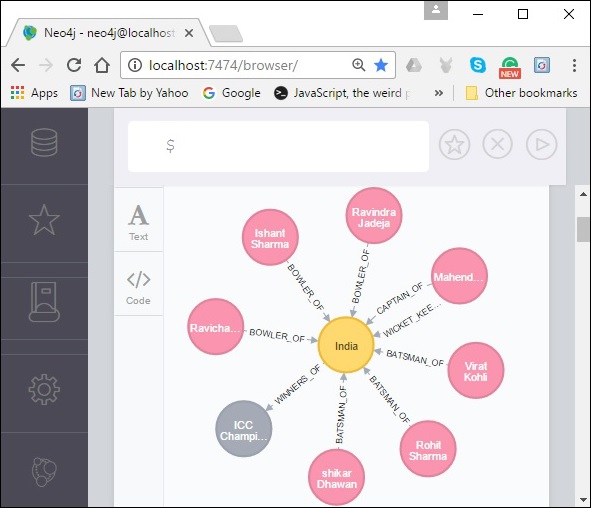
Count
Syntax
MATCH (n { name: 'A' })-->(x)
RETURN n, count(*)
Match(n {name: "India", result: "Winners"})--(x)
RETURN n, count(*)
Result
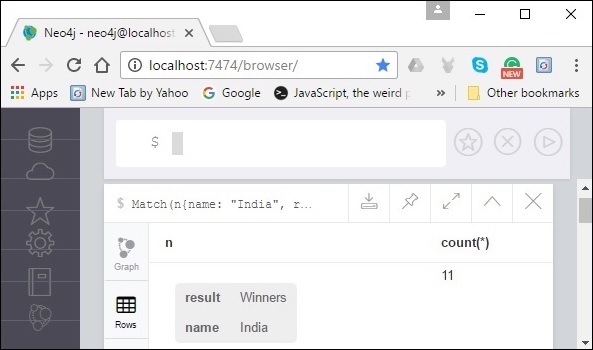
Group Count
Example
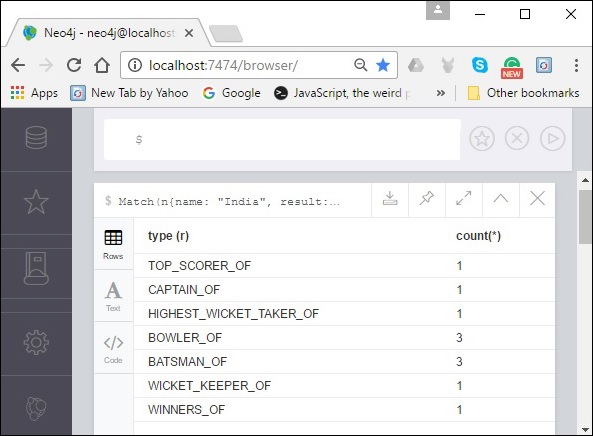
Match(n {name: "India", result: "Winners"})-[r]-(x)
RETURN type (r), count(*)
Result
16. Return Clause
The RETURN clause is used return nodes, relationships, and properties.
Returning Nodes
Syntax
Create (node:label {properties})
RETURN node
Example Return node,
Create (Dhoni:player {name: "MahendraSingh Dhoni", YOB: 1981, POB: "Ranchi"})
RETURN Dhoni
Returning Multiple Nodes
Example
CREATE (Ind:Country {name: "India", result: "Winners"})
CREATE (CT2013:Tornament {name: "ICC Champions Trophy 2013"})
RETURN Ind, CT2013
Returning Relationships
Syntax
CREATE (node1)-[Relationship:Relationship_type]->(node2)
RETURN Relationship
Example
CREATE (Ind)-[r1:WINNERS_OF {NRR:0.938 ,pts:6}]->(CT2013)
CREATE(Dhoni)-[r2:CAPTAIN_OF]->(Ind)
RETURN r1, r2
Returning Properties
Syntax
Match (node:label {properties . . . . . . . . . . })
Return node.property
Example
Match (Dhoni:player {name: "MahendraSingh Dhoni", YOB: 1981, POB: "Ranchi"})
Return Dhoni.name, Dhoni.POB
Returning All Elements
Example
Match p = (n {name: "India", result: "Winners"})-[r]-(x)
RETURN *
Returning a Variable With a Column Alias
Example
Match (Dhoni:player {name: "MahendraSingh Dhoni", YOB: 1981, POB: "Ranchi"})
Return Dhoni.POB as Place Of Birth
17. Order By Clause
Syntax
MATCH (n)
RETURN n.property1, n.property2 . . . . . . . .
ORDER BY n.property
First, create nodes;
CREATE(Dhawan:player {name:"shikar Dhawan", YOB: 1985, runs:363, country: "India"})
CREATE(Jonathan:player {name:"Jonathan Trott", YOB:1981, runs:229, country:"South Africa"})
CREATE(Sangakkara:player {name:"Kumar Sangakkara", YOB:1977, runs:222, country:"Srilanka"})
CREATE(Rohit:player {name:"Rohit Sharma", YOB: 1987, runs:177, country:"India"})
CREATE(Virat:player {name:"Virat Kohli", YOB: 1988, runs:176, country:"India"})
Example
MATCH (n)
RETURN n.name, n.runs
ORDER BY n.runs
Ordering Nodes by Multiple Properties
Syntax
MATCH (n)
RETURN n
ORDER BY n.name DESC
Example
MATCH (n)
RETURN n.name, n.runs
ORDER BY n.runs DESC
18. Limit Clause
Syntax
MATCH (n)
RETURN n
ORDER BY n.name
LIMIT 3
Seed the data,
CREATE(Dhawan:player {name:"shikar Dhawan", YOB: 1985, runs:363, country: "India"})
CREATE(Jonathan:player {name:"Jonathan Trott", YOB:1981, runs:229, country:"South Africa"})
CREATE(Sangakkara:player {name:"Kumar Sangakkara", YOB:1977, runs:222, country:"Srilanka"})
CREATE(Rohit:player {name:"Rohit Sharma", YOB: 1987, runs:177, country:"India"})
CREATE(Virat:player {name:"Virat Kohli", YOB: 1988, runs:176, country:"India"})
Order By clause;
MATCH (n)
RETURN n.name, n.runs
ORDER BY n.runs DESC
LIMIT 3
Limit with expression
MATCH (n)
RETURN n.name, n.runs
ORDER BY n.runs DESC
LIMIT toInt(3 * rand())+ 1
19. Skip Clause
Seed,
CREATE(Dhawan:player {name:"shikar Dhawan", YOB: 1985, runs:363, country: "India"})
CREATE(Jonathan:player {name:"Jonathan Trott", YOB:1981, runs:229, country:"South Africa"})
CREATE(Sangakkara:player {name:"Kumar Sangakkara", YOB:1977, runs:222, country:"Srilanka"})
CREATE(Rohit:player {name:"Rohit Sharma", YOB: 1987, runs:177, country:"India"})
CREATE(Virat:player {name:"Virat Kohli", YOB: 1988, runs:176, country:"India"})
Example
MATCH (n)
RETURN n.name, n.runs
ORDER BY n.runs DESC
SKIP 3
Skip Using Expression
MATCH (n)
RETURN n.name, n.runs
ORDER BY n.runs DESC
SKIP toInt (2*rand())+ 1
20. With Clause
Syntax
MATCH (n)
WITH n
ORDER BY n.property
RETURN collect(n.property)
Example
MATCH (n)
WITH n
ORDER BY n.name DESC LIMIT 3
RETURN collect(n.name)
21. Unwind Clause
Example
UNWIND [a, b, c, d] AS x
RETURN x
22. String Functions
| SN | Function | Description |
|---|---|---|
| 1 | UPPER | Used to change all letters into upper case letters. |
| 2 | LOWER | Used to change all letters into lower case letters. |
| 3 | SUBSTRING | Used to get substring of a given String. |
| 4 | Replace | Used to replace a substring with a given substring of a String. |
23. Aggregation Functions
| SN | Function | Description |
|---|---|---|
| 1 | COUNT | Returns the number of rows returned by MATCH command. |
| 2 | MAX | Returns the maximum value from a set of rows returned by MATCH command. |
| 3 | MIN | Returns the minimum value from a set of rows returned by MATCH command. |
| 4 | SUM | Returns the summation value of all rows returned by MATCH command. |
| 5 | AVG | Returns the average value of all rows returned by MATCH command. |
24. Indexing
Neo4j SQL supports Indexes on node or relationship properties to improve the performance of the application. We can create indexes on properties for all nodes, which have the same label name.
We can use these indexed columns on MATCH or WHERE or IN operator to improve the execution of CQL command.
Seed data,
CREATE (Dhawan:player {name: "shikar Dhawan", YOB: 1995, POB: "Delhi"})
Create a single-property range index for nodes
Syntax
CREATE INDEX index_name FOR (n:Label) ON (n.property_name)
Indexing,
CREATE INDEX player_name_index FOR (n:player) ON (n.name)
Create a single-property range index for relationships
Syntax
CREATE INDEX rel_range_index_name FOR ()-[r:RELATIONSHIP]-() ON (r.property_name)
Create a composite range index for nodes
Syntax
CREATE INDEX composite_range_node_index_name FOR (n:Label) ON (n.property_name_1, n.property_name_2)
Create a composite range index for relationships
CREATE INDEX composite_range_rel_index_name FOR ()-[r:RELATIONSHIP]-() ON (r.property_name_1, r.property_name_2)
Create a range index only if it does not already exist
Syntax
CREATE INDEX node_range_index_name IF NOT EXISTS
FOR (n:Label) ON (n.property_name)
DROP INDEX index_name [IF EXISTS]
Syntax
DROP INDEX index_name [IF EXISTS]
Text Index
Syntax
CREATE TEXT INDEX [index_name] [IF NOT EXISTS]
FOR (n:LabelName)
ON (n.propertyName)
[OPTIONS "{" option: value[, ...] "}"]
CREATE TEXT INDEX [index_name] [IF NOT EXISTS]
FOR ()-"["r:TYPE_NAME"]"-()
ON (r.propertyName)
[OPTIONS "{" option: value[, ...] "}"]
Create a node text index
CREATE TEXT INDEX node_text_index_nickname FOR (n:Person) ON (n.nickname)
Create a relationship text index
CREATE TEXT INDEX rel_text_index_name FOR ()-[r:KNOWS]-() ON (r.interest)
Create a text index only if it does not already exist
CREATE TEXT INDEX node_index_name IF NOT EXISTS FOR (n:Person) ON (n.nickname)
Create a text index specifying the index provider
CREATE TEXT INDEX text_index_with_indexprovider FOR ()-[r:TYPE]-() ON (r.prop1)
OPTIONS {indexProvider: 'text-2.0'}
For more information Indexing in Neo4j.
25. Constraints
Syntax
CREATE CONSTRAINT [constraint_name] [IF NOT EXISTS]
FOR (n:LabelName)
REQUIRE n.propertyName IS [NODE] UNIQUE
[OPTIONS "{" option: value[, ...] "}"]
CREATE CONSTRAINT [constraint_name] [IF NOT EXISTS]
FOR (n:LabelName)
REQUIRE (n.propertyName_1, ..., n.propertyName_n) IS [NODE] UNIQUE
[OPTIONS "{" option: value[, ...] "}"]
Example
CREATE CONSTRAINT book_isbn
FOR (book:Book) REQUIRE book.isbn IS UNIQUE
References
- Tutorial point